Author: Cody Bryant

  • Blue Cross Bowl to affect parking, traffic

    Blue Cross Bowl to affect parking, traffic

    We will welcome hundreds of high school students plus their families and friends again this year as we host the TSSAA Blue Cross Bowl state championship football games.

    Our campus will host games on Thursday, Friday and Saturday, Dec. 3 through Saturday, Dec. 5, at Tucker Stadium. Games will be held at 11 a.m., 3 p.m. and 7 p.m. each of the three days. Friday games are expected to bring the most weekday visitors to campus.

     The parking lots near Tucker Stadium, Volpe Library, Bryan Fine Arts and Johnson Hall will be barricaded and reserved for championship visitors who pay to park in this area. All other parking lots will remain open for faculty, staff and students based on hangtags and will be first come, first served. This year, we anticipate ample parking availability for faculty, staff and students due to the decreased number of people travelling to campus each day.

    TSSAA volunteer parking teams will be monitoring lots and collecting money from visitors paying to park in dedicated campus lots.

    To see a map of reserved championship parking spaces, visit
    https://www.tntech.edu/maps/tssaa_parking.pdf

    Where Not to Park
    Please park in permit areas only. Please do not park on the grass, in fire lanes or other areas not normally designated as parking. Handicap parking will still require a designated handicap tag. Do not block service or mail spots.

    More Information about TSSAA Event
    Visit http://www.cookevillechampions.com for more information about the TSSAA BlueCross Bowl.

  • Halloween Door/Office Contest – Last chance to join the fun!

    Halloween Door/Office Contest – Last chance to join the fun!

    Friday, October 30th is the Halloween Door/Office Decorating Contest! There will be trophies for 1st, 2nd, and 3rd place. Past winners will be ineligible to win.

    Please email gradstudies@tntech.edu if you have any questions!

  • Paying on Your Student Account

    Paying on Your Student Account

    Many questions regarding your student account, making payments, selecting meal plans and parking permits, refunds, and enrolling in deferred payment plans can be answered using our tutorial videos and downloadable resources.

    Having trouble paying and confirming your account by August 22, 2020? If so, you can extend your deadline by enrolling in Save Your Seat.

    Payments can be made online 24/7 by students or their authorized users.

    Payments can be mailed using a paper check using the below address (make sure to include your student ID/T-number on the memo line of the check)

    Mailing Address:
    Tennessee Tech University
    Business Office
    Campus Box 5037
    Cookeville, TN 38505-0001

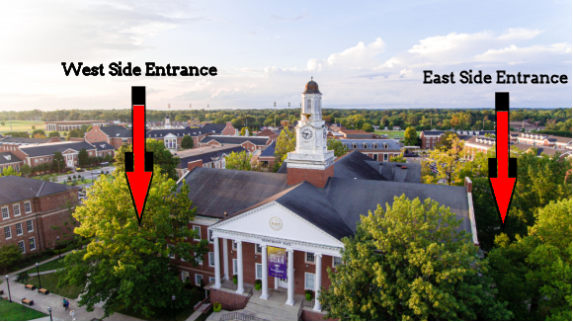
    In person payments can be made at cashier windows 8 a.m. – 3:30 p.m., and student account help is available at accounts receivable windows 8 a.m. – 4:30 p.m., Monday through Friday on the 1st Floor of Derryberry Hall.

    Enter Derryberry Hall 1st floor from the east entrance only and exit through the west entrance only.

    Students needing assistance from the Bursar and Business Office will enter a queue on the east end of the first floor with clear exterior signage directing them to the correct door. Once in the queue students will be directed where to receive service in a socially distanced manner. Questions and help are also available by emailing bursar@tntech.edu.

    Anyone needing to access the second, third, or fourth floors of the building should use the main 2nd floor front entrance or the first floor stairwell through the designated east entrance to the building. Please also use the east entrance for elevator access.

  • Website Update: Express Link

    Website Update: Express Link

    The Express link in the top navigation has been updated to link directly to Tech Express! In Tech Express, you have quick and easy access to resources and services such as Tech Email, iLearn, Self Service, Banner, and more. With this change, the drop-down menu (visible when you hover your mouse over “Express”) has been updated, as well as the Faculty, Staff, and Student Resource pages, to focus on campus resources and services.

    If you have any questions about Tech Express, please contact the myTECH Helpdesk at (931) 372-3975 or helpdesk@tntech.edu.